




Tektronix TBS1000C 디지털 스토리지 오실로스코프
Tektronix TBS1000C 디지털 스토리지 오실로스코프는 교육 기관, 임베디드 설계 엔지니어 및 메이커 커뮤니티를 위해 설계되었습니다. 이 오실로스코프는 7인치 WVGA 컬러 디스플레이, 1GS/s 샘플 레이트 및 50~200MHz의 대역폭이 특징입니다. 이 장비는 실습과 단계별 지침을 통합한 혁신적인 코스웨어 시스템과 함께 제공됩니다. Help Anywhere® 시스템이 새로운 사용자를 위해 사용자 인터페이스 어디서나 유용한 팁을 제공합니다. Tektronix TBS1000C 디지털 스토리지 오실로스코프는 5년 보증 조건으로 제공됩니다.
특징
- 7인치 WVGA 컬러 디스플레이
- 50% 더 많은 신호를 표시하는 15개 수평 영역
- 32개의 자동 측정값
- 동시 시간 및 주파수 영역 보기가 있는 이중 윈도우 FFT
- 트리거 주파수 카운터
- 팬 및 줌 기능
- 10개 언어를 지원하는 다중 언어 사용자 인터페이스
- 작은 설치 면적 및 경량
- 저잡음 작동을 위한 팬리스 설계
- 데이터 저장을 위한 전면 패널의 USB 2.0 호스트 포트
- PC에 연결하기 위한 후면 패널의 USB 2.0 호스트 장치
애플리케이션
- Educational institutions
- Embedded design engineers
- Maker communities
사양
- 200MHz, 100MHz, 70MHz 및 50MHz 대역폭 모델
- 2채널 모델
- 모든 채널에서 1GS/s의 샘플 레이트 제공
- 모든 채널에서 20k 포인트 레코드 길이 제공
- 펄스, 런트, 라인 트리거를 포함한 고급 트리거
- 5년 보증
비디오
앞면

뒷면

더 빠르게 학습하고 작업하도록 설계

The TBS1000C oscilloscopes combine features and capabilities to provide quick hands-on learning and easy operation. Dedicated front panel controls offer easy access to important settings. The graticule, with 10 vertical divisions and 15 horizontal divisions, enables users to see more signals per screen. The large menus with clearly labeled and colored information are easy to navigate. The zoom function quickly pans through the record and zooms in to view the signal details in areas of interest.
자동 측정 및 분석

A comprehensive set of automated measurements delivers fast and convenient testing of various signal conditions for applications. Measurements are displayed on a single screen and grouped into four categories: frequency, time, amplitude, and area. All measurements are displayed on a single measurement selection screen to simplify choosing from 32 automated measurements. Measurements are color-coded by the source and displayed on a transparent background so waveforms are not obscured by the readouts.
FFT 기능

The FFT function allows users to understand the frequency content of the signals by pressing the FFT button on the front panel. Users can display only the FFT or turn on the source waveform display to view both the frequency and the time domain waveform. A transparent readout shows vital settings without blocking the FFT display.
HelpEverywhere

The HelpEverywhere system provides help text with graphics to illustrate the different settings on the instrument. This makes it easier for new users to know which measurement to use and interpret the results. Help is offered in the same language as the user interface.
PC 연결성
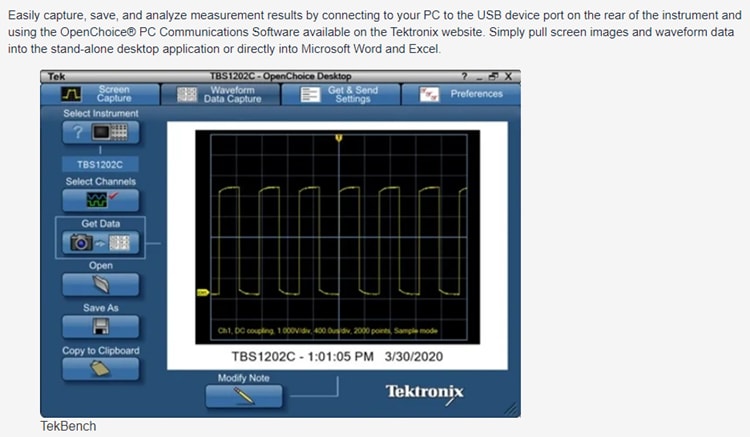
Easily capture, save, and analyze measurement results by connecting a PC to the USB device port on the rear of the instrument and using the OpenChoice® PC Communications Software on the Tektronix website. Users can simply pull screen images and waveform data into the stand-alone desktop application or directly into Microsoft Word and Excel.